
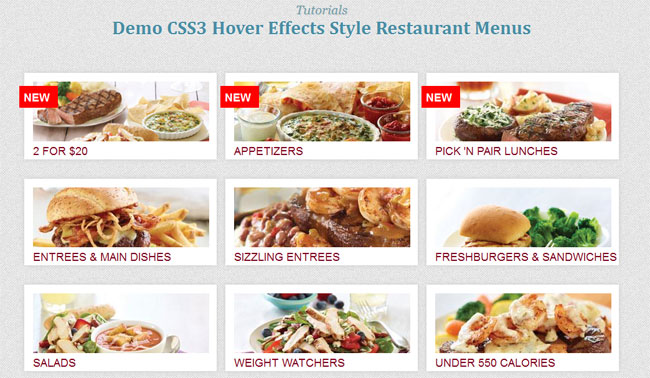
This time I will show you CSS3 hover effects using CSS properties, this sample design you use for purpose restaurant website, foods or product and more. In this tutorial, we only use CSS transition and box shadow style to create beautiful image style with show and hidden text. In fact now we can use more properties of CSS to create style effects in stead of jQuery hover effects.
 Demo download
This image menu style we have design to fix the layout support from big screens to smaller screens, to make it responsive display.
Please note that this will only work properly in modern browsers that support the CSS3 properties in use.
Let’s start with the HTML
The Markup
The HTML will be built up viewport meta tag to control layout on mobile browsers
A typical mobile-optimized site contains something like the following:
The CSS3 Hover Effects Style Restaurant Menus will have the following structure:
- new
2 for $20
1 Appetizer + 2 Entrees = Just $20

- new
Appetizers
Start a meal off right with your favorite from our menu of signature appetizers. Can't choose just one? You don't have
- new
Pick 'N Pair Lunches
Make your own lunch combo with soups, salads, sandwiches & more.
Entrees & Main Dishes
Our menu opens up a world of choices, loaded with flavor. From juicy steaks and succulent seafood, to saucy ribs and burgers.
Sizzling Entrees
Fresh flavor never sounded so good.
Freshburgers & Sandwiches
From mouthwatering Freshburgers to big and tasty Sandwiches, we've got the flavors to satisfy your cravings.
Salads
Fresh & Delicious
Weight Watchers
Delicious Entrées endorsed by Weight Watchers. Eating Right Never Tasted So Good.
Under 550 Calories
Big Flavor. Big Portions. Big Value. All Under 550 Calories.


The Cascading Style Sheets (CSS)
.our_menu{width:970px; margin:0 auto;}
ul,li{margin:0;padding:0;list-style:none}

.menu .item{float:left;position:relative}
.menu .item .new{background-position:-248px -482px;height:28px;left:-9px;padding:7px 0 0 7px;top:41px;width:55px; background:#F00;color:#FFF;display:block;font-family:"league-gothic",sans-serif;font-size:18px;position:absolute;text-transform:uppercase;z-index:1; }
.menu .item a{background-color:#FFF;color:#820922;display:block;overflow:hidden;position:absolute;box-shadow:0 0 7px 0 #CCC;-moz-box-shadow:0 0 7px 0 #CCC;-webkit-box-shadow:0 0 7px 0 #CCC}
.menu .item a:hover{z-index:2;-webkit-transition:height .2s ease-in-out;-moz-transition:height .2s ease-in-out;-o-transition:height .2s ease-in-out;-ms-transition:height .2s ease-in-out;transition:height .2s ease-in-out}
.menu .item:hover .new{z-index:3}
.menu .item a h3{border:0;font-family:"league-gothic",sans-serif;font-size:18px;margin:0 0 .5em 0;padding:0;text-transform:uppercase; }
.menu .item a p{color:#432;font-size:16px;}

.our_menu .menu{float:left;margin:0 0 50px 0}
.our_menu .menu .item{background-position:9px -791px;height:170px;padding:0 0 0 7px;width:316px}
.our_menu .menu .item a{height:25px;padding:114px 0 0 14px;top:20px;width:295px;text-decoration:none;}
.our_menu .menu .item a:hover{height:132px;padding-top:179px}
.our_menu .menu .item a img{clip:rect(0px,283px,96px,0px);height:164px;position:absolute;top:14px;width:283px}
.our_menu .menu .item a:hover img{clip:auto}
.our_menu .menu .item .new{left:-1px}
The media queries css will have the following code:
@media only screen and (max-width: 967px) {
.our_menu{ width:660px;margin:0 auto;}
}
@media only screen and (max-width: 620px) {
.our_menu{ width:330px;margin:0 auto;}
}
Now! We have a beautiful CSS3 Hover Effects Style Restaurant Menus. Check out the demo below, and feel free to download this example for future use. I hope you enjoyed this tutorial and find it useful!
