


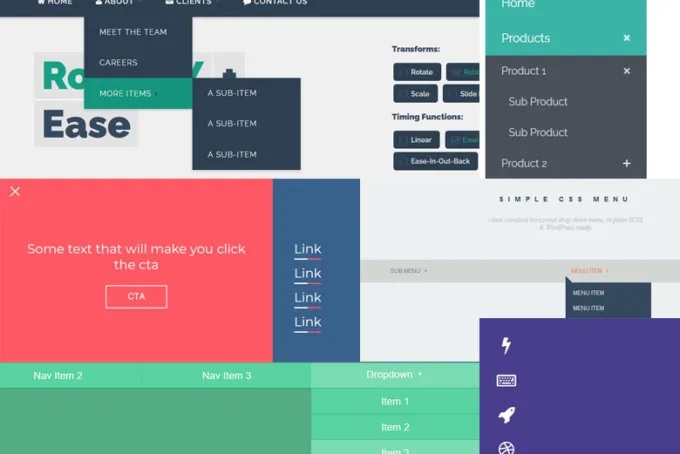
120 Free CSS CSS3 Menu Navigation 2024
If you’re looking for a sleek and stylish menu navigation system for your website, look no further than HTML CSS CSS3. This system is easy to use and customize, and it’s compatible with all major browsers. Plus, it’s free!
Animated Tab Bar

Also read: 54 Beautiful HTML CSS Button Style, 116 Useful CSS3 Tutorials Examples and Tricks for Designer
Colourful Flower Popup Menu

Bootstrap Mega menu with CSS

Pure CSS3 Mega Dropdown Menu With Animation

SVG Gooey Hover Menu Concept

Overlay menu

The Hamburger Menu

Lavalamp CSS Menu

One Page Navigation CSS Menu

Overlay Css menu

Pure CSS Menu Transition

Pure CSS One page vertical navigation

CSS Swinging Panel Menu

CSS Menu Icon Animation

Pure CSS – Menu App

CSS Side navigation & Hamburger Menu

CSS Menu Icons

PureCSS Menu

Fullscreen menu with cool links

Pure CSS Drawer Menu with overlay

Flower CSS Menu

Material design animation

Pure CSS menu cutout effect

Responsive Pure CSS Menu Drawer

Pure CSS Menu Navigation

Clickable CSS tabs

Pure CSS Menu Drawer w/ off-click

Simple CSS Drop Menu

Pure CSS Sidemenu

Responsive multilevel css menu

CSS Menu Unroll Effect

Css menu maker

css toggle btn

CSS menu transitions

CSS Drop Down Multi-column Menu with Search Field

Basic Flat CSS Menu

CSS3 Funny Menu

CSS3 Menu Dropdowns

CSS3 menu with effects
This is a CSS3 only slide effect menu.

CSS3 Side Menu
Simple CSS3 only menu. Best for single page applications/on page links.

CSS3 Menu Gradient Text
This menu for a clients new site I am developing, If you are using chrome or safari you will see gradient text 🙂

Metro style Windows 8 CSS3 Menu

Large horizontal menu with CSS3 transitions

CSS3 3D Transform Menu
CSS3 Menu continues to unfold as you dive deeper into the menu.

3-Level Responsive Drop Down Navigation Menu with jQuery CSS3

Pure Css3 Menu

Responsive CSS3 and jQuery Menu

CSS3 Menu hover effects

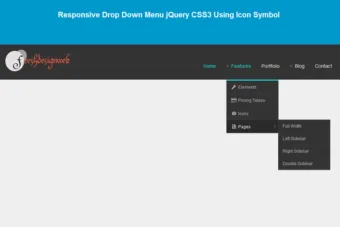
Responsive Drop Down Menu jQuery CSS3 Using Icon Symbol

Fully responsive CSS3 menu
A fully responsive menu without any need of JavaScript and using less than 200 lines of functional CSS code.

CSS3 Menu With Icons

Responsive CSS3 Menu with Toggle Animation

Off canvas menu

Reveal Nav Menu Scotch

Flat CSS3 Menu

Some more ideas Slide Menu

CSS3 MENU BUILD

Responsive menu with sub-menu

Color-Coded CSS3 Dropdown Navigation with Submenus
Dropdown menus have been around for years and they’ve served their purpose quite well. Very much like old-yet-functional technology, dropdown menus continue to support users from all browsers and operating systems. The major differences have come about from a change in newer trends with jQuery and CSS3.

Perspective Page View Navigation
Some effects for a perspective page view navigation where the page itself gets pushed away in 3D to reveal a menu or other items. This navigation idea is seen in mobile app design and it wanted to explore some more effects.

Hidden Flyout Shopping Cart Menu with CSS3
For every modern eCommerce website the shopping cart is a crucial feature. Most of the time visitors will have to click a link or button to view all the items in their cart. This is a much cleaner solution because everything can listed on the page without sacrificing extra information.

Animated Border Menus
A tutorial on how to create a off-canvas icon navigation with an animated border effect. The menu effect is inspired by CreativeDash’s bounce menu for mobile apps.

Listing Widget Using CSS3 and jQuery
In this tutorial I want to demonstrate how to build a dynamic careers/jobs page with jQuery. This method will save room on the page and offer a quick tabbed interface for users to switch between different positions. And this technique can applied to any company website so there’s a lot of flexibility.

Setting Active States on Sticky Navigations while Scrolling
This experiment shows how to set the active state on links in a sticky navigation bar when scrolling.

An other navigation item

Custom CSS3 & jQuery Icon Font Dropdown Menu
This tutorial will guide you through the process of creating a jQuery-powered icon picker input field. The library is call fontIconPicker which is free and open source to use in any number of projects. It is a great choice because all the fonts are completely free and you don’t even need to worry about rendering issues.

Responsive Sliding Drawer Menu with Lightbox Effect
One popular navigation trend is the hidden sliding menu for large and small screen displays. Some may call this a hamburger menu, side-toggle menu, sliding drawer menu, or anything similar – but it all describe the same interface.

Retro Navigation – Full CSS

CSS3/Javascript Pure Dropdown Menu

Responsive CSS3 Side Navigation Menu
Media Queries Transitions (resize the window slowly to see the transitions), nav items slide out on hover when it collapses on smaller screens.

iOS style sliding menu

CSS3 Responsive Navigation Menu

Navigation indicator from YNAB

Social App Menu

Side Sliding Menu CSS

iOS like mobile navigation

Subway – Red Line Menu

Simple dropdown-menu

Dropdown Menu Animation

Dropy | A Simple SCSS & jQuery dropdown

Solution for Long Drop Down Items
A scrolling dropdown solution make for long list of categories.

Navigation With Marker
Responsive navigation list with marker on rollover (no images).

Country flag selector

CSS3 Drop-down menu

Flat UI Navigation Menus

CSS Menu from side

Simple Vertical Menu with jQuery and CSS3
Simple, but very stylish vertical menu using some CSS3, a bit of jQuery, a custom text font and the most impressive icon font you can find at this moment, which is FontAwesome.

CSS3 Navigation slide hover effect
The slide hover effect on Navigation have been quite interesting to work and enhances the beauty of the website.

Minimalistic Navigation Menus
Just make few menus really quick. You can reuse them. Just need to change the color of the header. The active and hover states of the navigation links use rgba for their background colors.

Responsive Slide Toggle Menu

Admin menu with buttons and icons – css3 + jquery
Administration bar (or menu or navigation) with css3, jquery and fontawesome. When toggle on button class active is added. Design ispired by old android power widget.

flip menu perspective

Circular Navigation Menu

Cool Navigation

Windows menu

Responsive Navigation
Part of a update to a framework I make for a company, much of the LESS code is condense and separated into different sections of the overall framework. The JS looks at the current navigation and pushes it into a mobile version when needed

Habrahabr side panel menu

CSS menu rebound

Sliding Menu Item with Description
A simple CSS menu with items having description. A cool sliding effect on hover.

Social Navigation

Menu with Notification Badges

CSS Navigation Menu with Icons

CSS3 Exploding Menu
An experimental CSS transition to create animated random box effect.

Creative CSS3 Animation Menus

CSS3 Menu Hover Effect

Circle Navigation Effect with CSS3

Animated Text and Icon Menu
There is a menu with a slick animated feature enjoyable on hover. The idea is to drag certain items, modify and animate the background color of the item and then drag the items back with a different color.

jQuery Menu Moving Boxes Content
It’s really sweet animations using jQuery. The idea is to have small boxes scattered around the top of the site and when a menu item is clicked, animate boxes to form the main content area. We’ll use some different animation effects that it will add any additional options to the menu item.

Animated Content Menu with jQuery
This is a menu with the black animated content with jQuery for a theme restaurant. Menu items will be moderated and when clicked, a content area with more information will appear. Furthermore, it is the background image will change that menu item is clicked.

jQuery Cursor following menu
This is a navigation menu that follows the cursor, create with the jQuery framework and CSS is easy to implement and configure.

Simple navigation with CSS3 and jQuery
It is a simple navigation menu built with CSS3 and the jQuery UI.

Overlay Effect Menu with jQuery
This is a simple menu that stand out once it fly by covering everything except the menu with a dark overlay. The menu will remain white and a zone of sub-menu to expand. It will create this effect using jQuery.

Fly-out Menu with jQuery and CSS3
This is a menu full page cufonized has two interesting features: when hovering over menu items it move an item hover state that fits the width of the current item , and we’ll slip on a bar description from the left side of the page, rushing to the current menu item.

Hover Slide Effect with jQuery
This is a neat effect with few images using jQuery. The main idea is to have a picture box with multiple images that slide when you hover over them, revealing other images. The sliding effect is random, ie the images will slide up or down, left or right, fading out or not. When you click on an area, all areas to slip on their images.

Collapsing Site Navigation with jQuery
Collapsing menu that contains vertical navigation bars and a slide out content area. When hovering over a menu item, an image slides down from the top and a submenu slides up from the bottom

Beautiful Background Image Navigation with jQuery
The background image for each item will be animated to slide into place in different times, creating a really nice effect.

Bubble Navigation with jQuery
The idea is to have some round navigation icons that release a bubble when hovering over them.

Sliding Background Image Menuwith jQuery
This menu has several components, each corresponding to a different background image that will appear on all signs when it hover over a panel label. In addition, a sub-menu to slip from the bottom. This menu comes with configuration options, such as image size, the rollover states and custom default.




Beautifully done! Wow.
excellent job…
Hey Graham,
All the topic are best in the site and we mostly learn from this site thanks for this.