


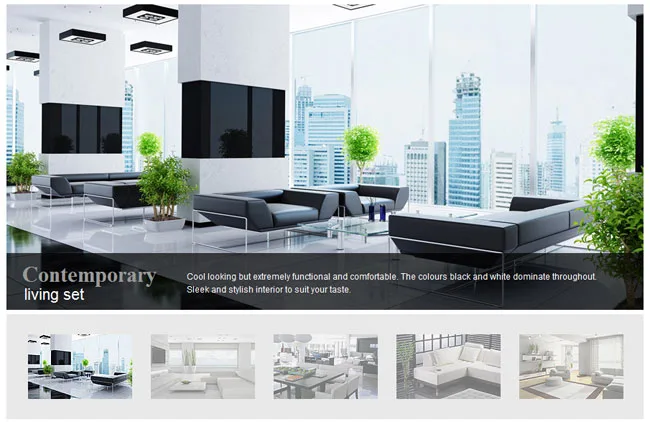
Interior Dessign jQuery Image Slideshow Tutorial
In this tutorial, we’ll create a beautiful interior design image slideshow with image thumbnail using Galleriffic jQuery plugin. In this slideshow, it have create select image thumb and using high light title and text description on image slideshow as well. Using jQuery you can easily create image slideshow and it is a profession platform for design website.

Also read: 54 Beautiful HTML CSS Button Style, 16 Best Useful jQuery Plugin To Enhance Your Design, 116 Useful CSS3 Tutorials Examples and Tricks for Designer
In my previous post, i have collection more useful jquery image slider and slideshow and you can find out more on this post.
This slider we’ll be using the following jQuery plugins:
– Galleriffic – A jQuery plugin for rendering rich, fast-performing photo galleries
Let’s start with the HTML
The Markup
The slider plugin and javascript function will have the following structure:
The Cascading Style Sheets (CSS)
The Interior Dessign slideshow css will have the following code:
/*======= width =======*/
.main_gallery{margin:0 auto; text-align:left; width:887px;}

/*--- gallery ---*/
div.content-gallery {
	/* The display of content is enabled using jQuery so that the slideshow content won't display unless javascript is enabled. */
	display: none;
	width: 887px
}
div.content-gallery a, div.navigation a {
	text-decoration: none;
	color: #777;
}
div.content-gallery a:focus, div.content-gallery a:hover, div.content a:active {
	text-decoration: underline;
}
div.slideshow-container {
	position: relative;
	clear: both;
	height: 425px; /* This should be set to be at least the height of the largest image in the slideshow */
}
div.loader {
	position: absolute;
	top: 0;
	left: 0;
	background-image: url(images/loader-gall.gif);
	background-repeat: no-repeat;
	background-position: center;
	width: 887px;
	height: 425px; /* This should be set to be at least the height of the largest image in the slideshow */
}
div.slideshow {
	height: 742px;
	/*overflow:hidden;*/
}
div.slideshow span.image-wrapper {
	display: block;
	position: absolute;
	top: 0;
	left: 0;
}
div.slideshow a.advance-link {
	display: block;
	width: 887px;
	height: 425px; /* This should be set to be at least the height of the largest image in the slideshow */
	text-align: center;
	overflow:hidden;
}
div.slideshow a.advance-link:hover, div.slideshow a.advance-link:active, div.slideshow a.advance-link:visited {
	text-decoration: none;
}
div.slideshow img {
	position:absolute;
	left:0;
	top:0;
}
div.caption-container {
	/*position: relative;
	clear: both;
	height:7px;*/
}
span.image-caption {
	display: block;
	position: absolute;
	width: 887px;
	top: 0;
	left: 0;
}
div.caption {
	width:887px;
	margin-top:346px;
	background: url(images/bg.png);height:79px;
}
div.caption h4 {
	float:left;
	z-index:10;
	font-size:31px;
	line-height:1.2em;
	display:block; margin:10px 0px 0px 0px; *margin:-4px 0px 0px 0px;
	margin-bottom:5px
}div.caption .indent{
		margin:16px 0 0 22px; position:relative; color:#999;
}div.caption .indent1{
		margin:44px 0 0 25px; *margin-left:3px; position:absolute; font-family:Arial, Helvetica, sans-serif; font-size:22px; color:#fff;
}
div.image-desc {
	font-size:10px;
	color:#ffffff; font-family:Arial, Helvetica, sans-serif; font-size:12px;
	float:right; line-height:1.5em;
	padding:23px 30px 0 251px; *padding-left:229px; position:absolute
}

div.navigation {
	background:#e9e9e9; padding:28px 28px 28px 30px; height:90px; position:absolute; z-index:1; top:439px;
	/* The navigation style is set using jQuery so that the javascript specific styles won't be applied unless javascript is enabled. */
}

ul.thumbs {
	clear: both;
	margin: 0;
	padding: 0;
}
ul.thumbs li {
	float: left;
	padding: 0;
	padding:0 26px 0 0;
	list-style: none;
}
ul.thumbs li.last {
	padding-right:0;
}
a.thumb {
	display: block;
}
ul.thumbs li.selected a.thumb {
}
a.thumb:focus {
	outline: none;
}
ul.thumbs img {
	border: none;
	display: block;
}
Now! It have a interior dessign jQuery image slideshow. Check out the demo below, and feel free to download this example for future use. I hope you enjoyed this tutorial and find it useful!




Excellent style, is what I was looking for
very nice yar……….